Todo List App
NewA full-featured todo list app with 3 unique themes (Classic, Mono, Bubbly), folder organization, task comments, and celebration animations. Demonstrates advanced state management and theme switching.
Overview
This showcase demonstrates a production-ready todo list application with multiple themes and advanced features. Users can organize tasks into folders (Work, Personal, Shopping), add comments, and switch between three distinct visual themes.
Key features include:
- Three unique themes with different visual styles and layouts
- Folder-based task organization with filtering
- Task completion tracking with progress indicators
- Comment system for task notes
- Celebration animation when all tasks are completed
- Smooth theme transitions and animations
Themes
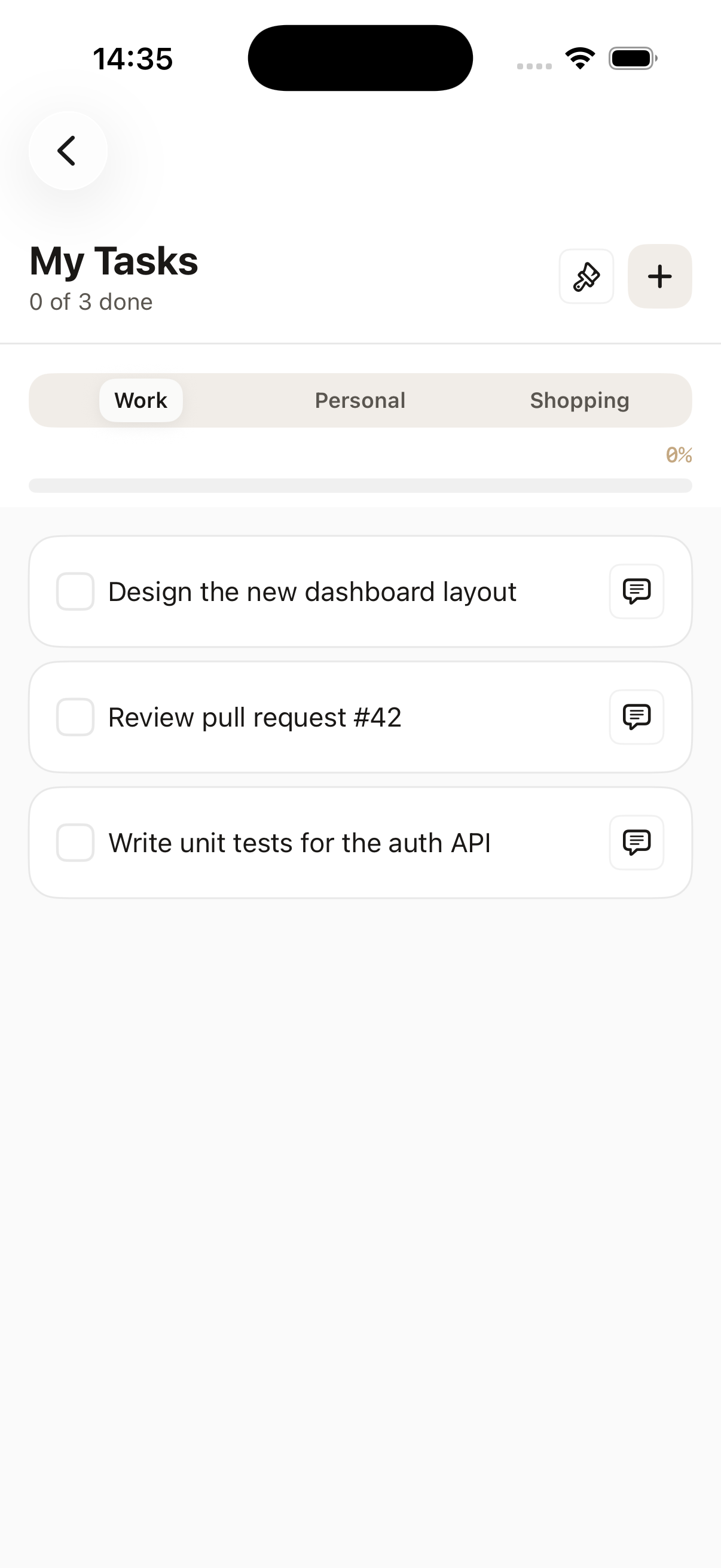
Classic
Segmented tabs, elevated cards, DS defaults. Traditional todo list layout with card-based design.
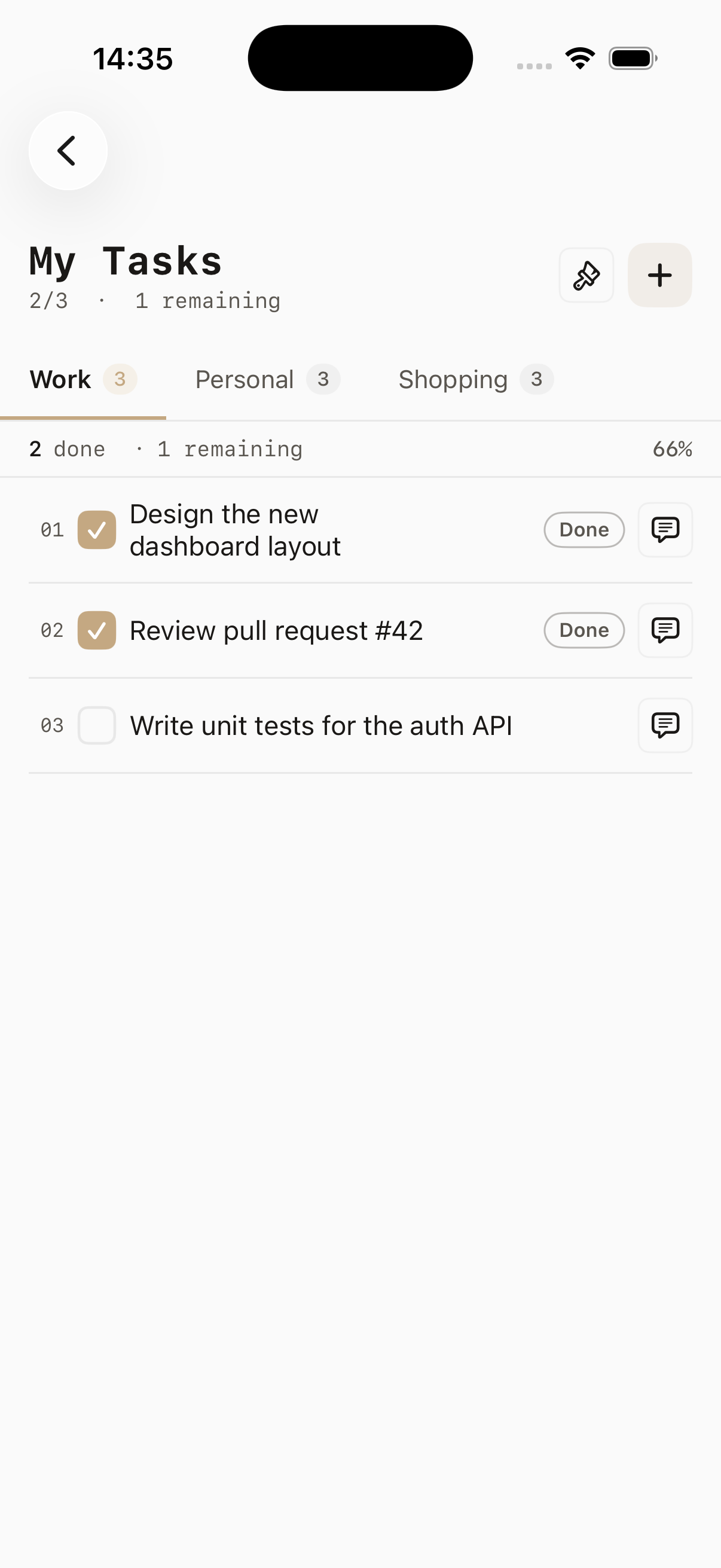
Mono
No cards, numbered rows, text-only stats. Minimalist design focused on content and typography.
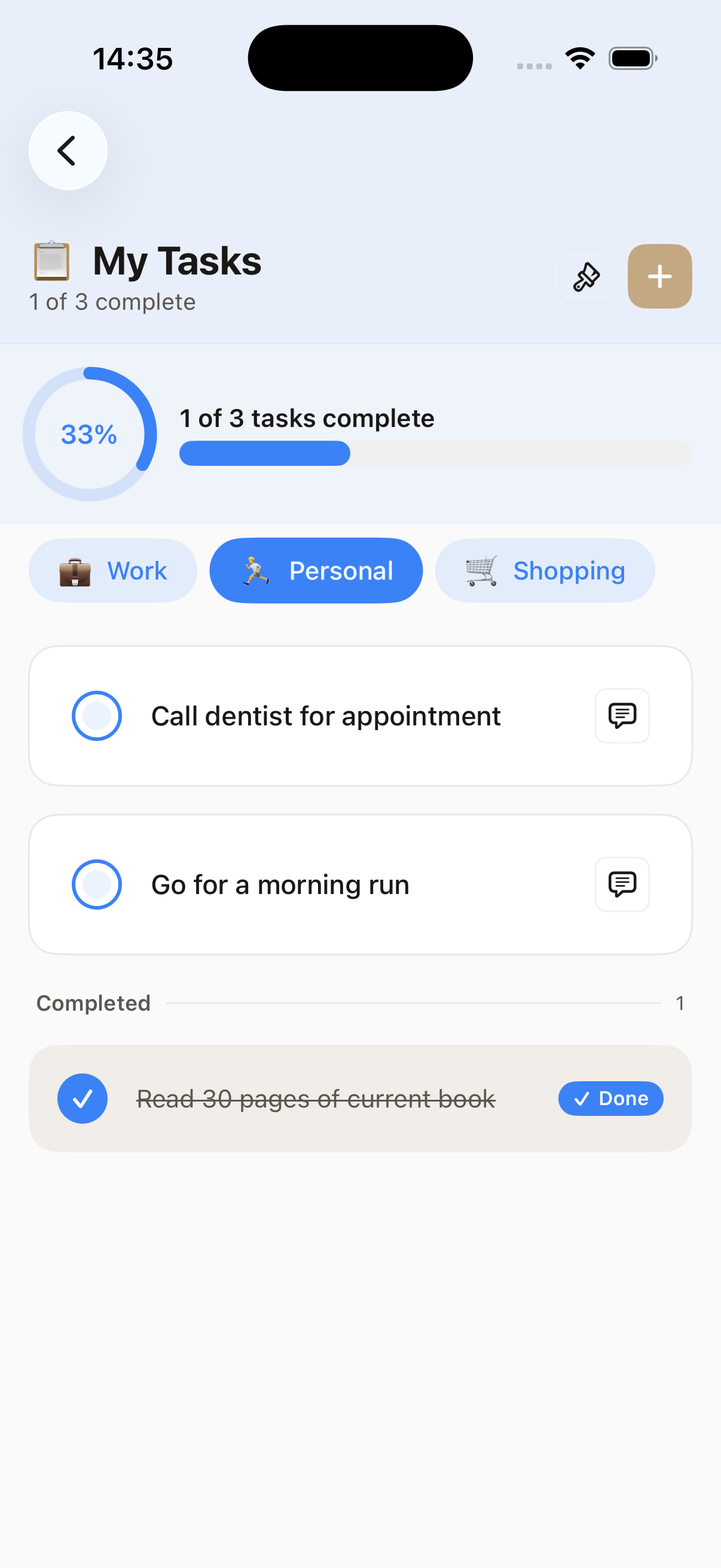
Bubbly
Pill chips, grouped tasks, progress circle. Playful design with rounded elements and visual progress.
Components Used
Key Features
Task Creation & Completion
Add new tasks with a bottom sheet, mark as complete with checkboxes, and see celebration animations when all tasks are done.
Folder Organization
Organize tasks into Work, Personal, and Shopping folders with segmented control navigation.
3 Theme Variants
Switch between Classic (cards), Mono (minimalist), and Bubbly (playful) themes with smooth transitions.
Task Comments
Add notes and comments to tasks using a bottom sheet with text input.
Progress Tracking
Visual progress bars and circular progress indicators show completion status.
Toast Notifications
Theme changes trigger toast messages with smooth animations.
Code Highlights
Theme Switching
Smooth transitions between three distinct themes with different layouts and components.
enum TodoTheme: String, CaseIterable {
    case classic = "Classic"
    case mono    = "Mono"
    case bubbly  = "Bubbly"

    var icon: String {
        switch self {
        case .classic: return "square.stack.3d.up"
        case .mono:    return "line.3.horizontal"
        case .bubbly:  return "circle.hexagongrid.fill"
        }
    }

    var toastMessage: String {
        switch self {
        case .classic: return "Classic — segmented tabs, elevated cards"
        case .mono:    return "Mono — no cards, numbered rows"
        case .bubbly:  return "Bubbly — pill chips, progress circle"
        }
    }
}

@State private var currentTheme: TodoTheme = .classic

var body: some View {
    VStack {
        themeContent
            .transition(.opacity)
    }
    .animation(DSAnimation.smooth, value: currentTheme)
}
State Management
Complex state management with multiple views and computed properties for filtered data.
@State private var tasks: [AppTodoTask] = [...]
@State private var selectedFolder = "Work"
@State private var showAddSheet = false
@State private var commentTaskId: UUID?

// Computed properties for filtered data
private var filteredIndices: [Int] {
    tasks.indices.filter { tasks[$0].folder == selectedFolder }
}

private var pendingIndices: [Int] {
    filteredIndices.filter { !tasks[$0].isCompleted }
}

private var completedIndices: [Int] {
    filteredIndices.filter { tasks[$0].isCompleted }
}

private var progress: Double {
    guard totalCount > 0 else { return 0 }
    return Double(completedCount) / Double(totalCount)
}
Component Composition
Combining multiple components to create rich task items with actions.
DSCard {
    HStack(spacing: DSSpacing.sm) {
        DSCheckbox(tasks[i].text, isChecked: $tasks[i].isCompleted)
            .onChange(of: tasks[i].isCompleted) {
                if allTasksCompleted { showCelebration = true }
            }

        VStack(alignment: .leading, spacing: 4) {
            if !tasks[i].comment.isEmpty {
                Text(tasks[i].comment)
                    .dsTextStyle(.caption)
                    .foregroundColor(.dsForegroundMuted)
            }
        }

        Spacer()

        DSButton("Comment", variant: .ghost, size: .sm) {
            commentTaskId = tasks[i].id
        }
    }
}
Bottom Sheet Pattern
Using bottom sheets for modal content like adding tasks and comments.
// Add Task Sheet
.overlay {
    if showAddSheet {
        DSBottomSheet(isPresented: $showAddSheet) {
            VStack(alignment: .leading, spacing: DSSpacing.md) {
                DSText("New Task", style: .headline)

                DSTextField(
                    placeholder: "Task name",
                    text: $newTaskText
                )

                DSButton("Add", variant: .primary) {
                    addTask()
                    showAddSheet = false
                }
                .frame(maxWidth: .infinity)
            }
            .padding(DSSpacing.lg)
        }
    }
}
What You'll Learn
Complex State Management
Managing multiple @State variables, computed properties, and data filtering across different views.
Theme Switching
Implementing dynamic layouts that change based on user preferences with smooth animations.
Bottom Sheet Patterns
Using bottom sheets for modal content like forms and comments.
Progress Tracking
Calculating and displaying completion progress with visual indicators.
Celebration Animations
Triggering animations and visual feedback when users complete all tasks.
Folder/Category Organization
Implementing filtering and navigation between different content categories.
View Source Code
Explore the complete implementation in the DesignSystem repository.
View on GitHub